Vary filled region settings by camera type
Most other Revit plugins lets you select a filled region type, one viewing distance and a single camera angle for processing. This is all fine until you suddently realize your project uses 3 different CCTV camera types, each with a different requirement for distance, angle and region type!
This scenario is perfect for RV CameraPlanner. The app lets you create one card for each camera type, like this:

Each card can be assigned an existing Revit filter from the active model. This let us be as granular as necessary when defining filled region rules. For example, our model below has 2 filters, each targetting one specific family type.
The first filter only looks for security cameras:

The second filter targets surveillance cameras:

In RV CameraPlanner’s settings window, we can assign each filter to its respective card. Each card can then get its own settings, such as the filled region type to use:
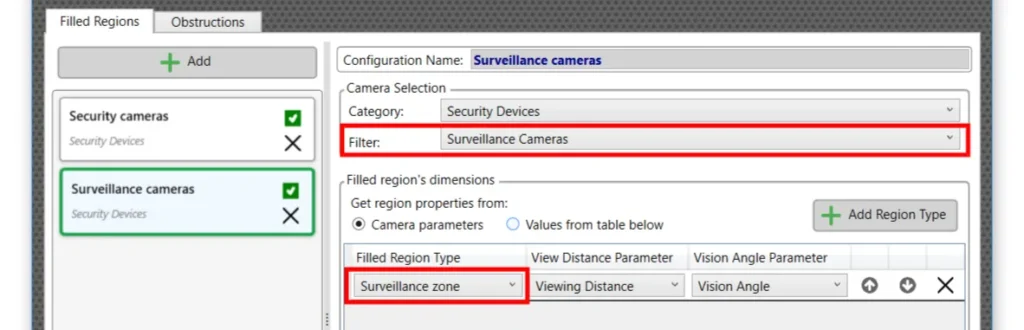
With these settings, when you run the “Cameras to Filled Regions” command, the app will use the correct filled region type and configurations for each camera, depending on its family type:
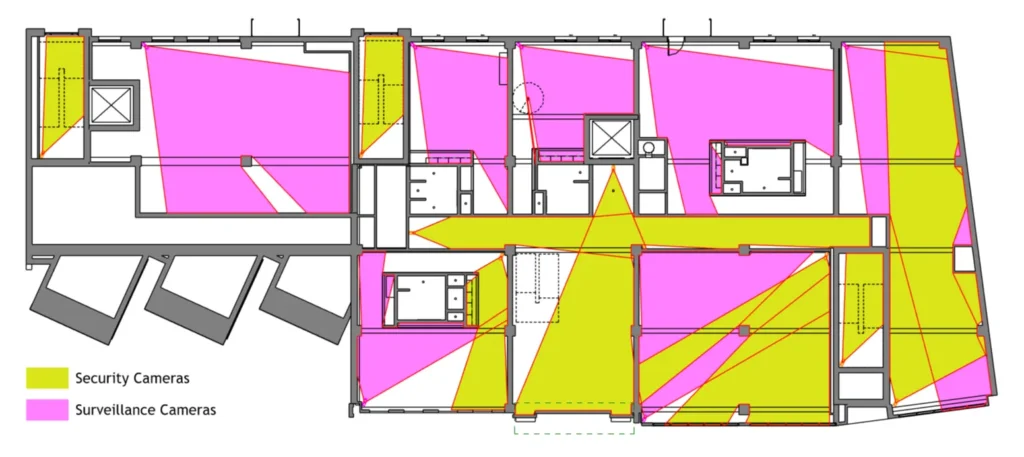
Of course, wer’e not restricted to family types. Being able to use any existing Revit filter from the model means we can be as specific or general as necessary.