RV Help Center
-
CAD Files Explorer
-
RV BatchTransmit
-
RV CameraPlanner
- Quick Start
- Speed up camera obstruction detection
- Configure camera obstructions
- Obstruction check plane
- Vary filled region settings by camera type
- Create multiple filled regions per camera
- Customize filled region appearance
- Filled region's origin offset
- Rotate filled region around camera
- Transfer settings between models
-
RV ClashBox
-
RV DeepClean
-
RV FamilyPurge
-
RV Live Coordinates
-
RV RoomLink
- Quick Start Guide
- Settings Checklist
- Use Custom Filters
- Guess Directions
- Use location projection on level
- Elements without rooms assigned
- Combine contained elements' parameters
- Count containted elements
- Distribute numeric room/space values
- Schedule objects above ceilings
- Schedule doors & windows by linked rooms
- Copy element data to rooms/spaces
- Extend Room/Spaces to Bounds
- Using a Network License
-
RV ZoneMonitor
-
Licensing
< All Topics
Print
Auto-save/sync the model after cleaning
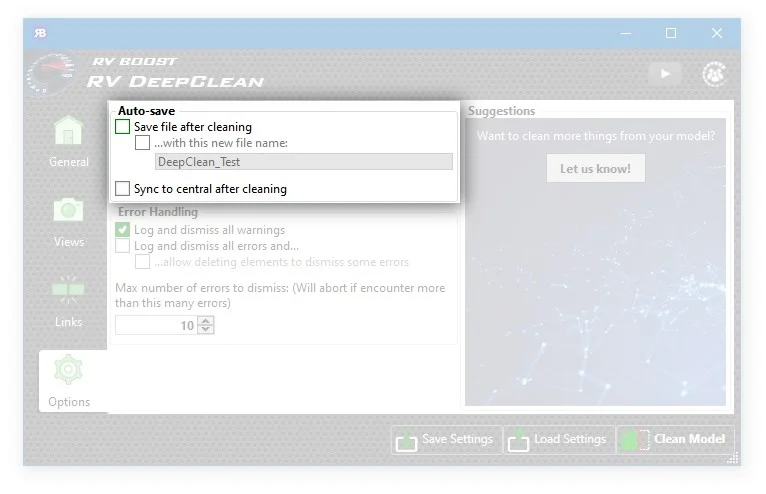
Would it be nice if you can tell Revit to save and sync the model whenever it’s done processing something?
Well, this is now possible with your RV DeepClean trial. Since the model cleaning process can take a while on big files, the app lets you specify if it should save and sync the model when all selected tasks are done. Imagine leaving the office on time and coming back the next day to a clean and fast model!
Even better, you can choose to save the file being cleaned with a new name. This is handy when you want to test how much the file size will drop given a particular combination of cleaning tasks.
Contents